例题1:使用MouseDown事件检测按下哪个鼠标按钮
Private Sub Form_MouseDown(Button As Integer,
Shift As Integer, X AsSingle, Y As Single)
If Button =1 Then Print "You Pressed theleft button."
If Button =2 Then Print "You Pressed theright button."
If Button =4 Then Print "You Pressed themiddle button."
End Sub
例题2:使用MouseMove 事件检测按下哪个特定鼠标按钮,而不管是否还按下了其它按钮。
Private Sub Form_MouseMove(Button As Integer,
Shift As Integer, X AsSingle, Y As Single)
If Button And 1 Then Print "You Pressedthe left button."
If Button And 2 Then Print "You Pressedthe right button."
If Button And 4 Then Print "You Pressedthe middle button."
End Sub
例题3:使用MouseMove事件检测多个鼠标按钮。
Private Sub Form_MouseMove(Button As Integer,
Shift As Integer, X As Single,Y As Single)
IfButton = 3 Then Print "You Pressed left and right button."
If Button = 5 Then Print "You Pressedleft and middle button."
If Button = 7 Then Print "You PressedBoth 3 button. "
End Sub
例题4:分别使用MouseDown事件和MouseMove 事件绘制直线。
Private Sub Form_MouseDown(Button As Integer,
Shift As Integer, X AsSingle, Y As Single)
Line-(X, Y)
End Sub
Private Sub Form_MouseMove(Button As Integer,
Shift As Integer, X AsSingle, Y As Single)
Line-(X, Y)
End Sub
例题5:判断MouseMove 事件跟鼠标移动速度还是跟时间有关。
Private Sub Form_MouseMove(Button As Integer,
Shift As Integer, X AsSingle, Y As Single)
Line-(X, Y)
Circle (X, Y), 50
End Sub
例题6:结合鼠标事件和绘图方法设计一个模拟的“画图”程序。
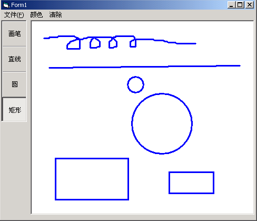
Privatecolor As Long //颜色
PrivatexStartAs Single //起点X坐标
PrivateyStartAs Single //起点Y坐标
PrivatexOldAs Single //上一点X坐标
PrivateyOldAs Single //上一点Y坐标
Privater As Single //当前半径
PrivaterOldAs Single //上一次半径
Private Sub Form_Load()
color= vbBlue
Picture1.DrawWidth = 3
End Sub
Private Sub Picture1_MouseDown(Button AsInteger,
Shift As Integer, X As Single, Y As Single)
IfButton = 1 Then
xStart= X
yStart= Y
xOld= xStart
yOld= yStart
rOld= 0
Picture1.DrawMode = 7
End If
End Sub
Private Sub Picture1_MouseMove()
'直线
IfOption2.Value = True And Button = 1 Then
Picture1.Line (xStart,yStart)-(xOld,yOld),color
Picture1.Line (xStart,yStart)-(X,Y), color
xOld= X
yOld= Y
End If
End Sub
Private Sub Picture1_MouseMove()
'圆
IfOption3.Value = True And Button = 1 Then
Picture1.Circle (xStart,yStart),rOld,color
r = Sqr((X- xStart)^ 2 + (Y - yStart)^ 2)
Picture1.Circle (xStart,yStart),r, color
rOld= r
End If
End Sub
Private Sub Picture1_MouseUp()
Picture1.DrawMode= 13
'直线
IfOption2.Value = True And Button = 1 Then
Picture1.Line (xStart,yStart)-(X,Y), color
End If
'圆
IfOption3.Value = True And Button = 1 Then
Picture1.Circle (xStart,yStart),r, color
End If
End Sub